Client Libraries
To build tools on Hankweave, you need to connect to its WebSocket API. This guide provides patterns and reference implementations for building robust clients. It focuses on practical application, while the formal protocol specification lives in the WebSocket Protocol.
Who is this for? Developers building integrations: custom dashboards, CI/CD tools, monitoring systems, or alternative interfaces. If you just need the protocol spec, see WebSocket Protocol.
Reference Implementation
Hankweave’s test suite includes TestWSClient, a battle-tested WebSocket client you can use as a foundation. It handles handshakes, event buffering, and the waiting patterns required for any real integration.
The Core Challenge: A Race Condition
A robust client must handle a subtle race condition: an event can arrive before you’re ready to listen for it. If you wait for a codon.completed event, but it fired miliseconds before your wait handler was attached, you’ll hang forever.
The solution is to buffer all incoming events. Before waiting for a new event, you first check the buffer. This guarantees you won’t miss events that arrived while your code was doing something else.
Client Structure
Here is the structure for a client that implements this pattern. It includes an event buffer, promise-based waiters, and connection logic.
import { WebSocket } from "ws";

class HankweaveClient {
  private ws: WebSocket | null = null;
  private events: ServerEvent[] = []; // Buffer for all incoming events
  private waiters = new Map<string, ((event: ServerEvent) => void)[]>();
  private subscribers = new Set<(event: ServerEvent) => void>();

  private connected = false;
  private handshakeComplete = false;
  private clientId: string | null = null;
  private grantedMode: ClientMode | null = null;

  // Connection and command methods will go here...
}
The events array is the safety net that solves the race condition. Every event is pushed into it, ensuring nothing is lost.
Connecting with Retries
Production clients need retry logic. A server might be slow to start, especially when launched via npx, and network connections can be unreliable.
async connectWithRetry(
  port: number,
  options: {
    mode?: ClientMode;
    maxRetries?: number;
    retryDelay?: number;
    timeout?: number;
  } = {}
): Promise<void> {
  const {
    mode = ClientMode.READANDWRITE,
    maxRetries = 30,
    retryDelay = 2000,
    timeout = 10000,
  } = options;

  let lastError: Error | null = null;

  for (let attempt = 1; attempt <= maxRetries; attempt++) {
    try {
      console.log(`Connection attempt ${attempt}/${maxRetries}...`);
      await this.connect(port, { mode, timeout });
      return; // Success
    } catch (error) {
      lastError = error as Error;
      if (attempt < maxRetries) {
        await new Promise((resolve) => setTimeout(resolve, retryDelay));
      }
    }
  }

  throw new Error(
    `Failed to connect after ${maxRetries} attempts: ${lastError?.message}`
  );
}
Handshake Flow
The handshake is critical. It determines your access level and can retrieve historical events so you don’t miss anything that happened before you connected. Always complete the handshake before sending commands.
async connect(
  port: number,
  options: { mode?: ClientMode; timeout?: number } = {}
): Promise<void> {
  const { mode = ClientMode.READANDWRITE, timeout = 10000 } = options;

  return new Promise((resolve, reject) => {
    const timeoutId = setTimeout(() => {
      reject(new Error(`Connection timed out after ${timeout}ms`));
    }, timeout);

    this.ws = new WebSocket(`ws://localhost:${port}`);

    this.ws.onopen = () => {
      this.connected = true;
      // Handshake immediately on connect
      this.performHandshake(mode)
        .then(() => {
          clearTimeout(timeoutId);
          resolve();
        })
        .catch(reject);
    };

    this.ws.onmessage = (message) => {
      const event = JSON.parse(message.data.toString()) as ServerEvent;
      this.events.push(event); // Buffer all events
      this.notifyWaiters(event);
      this.subscribers.forEach((callback) => callback(event));
    };

    this.ws.onerror = (err) => reject(err);
    this.ws.onclose = () => {
      this.connected = false;
      this.handshakeComplete = false;
    };
  });
}

private async performHandshake(mode: ClientMode): Promise<void> {
  // sendPreviousEvents: true retrieves all events from the start of the run.
  // This ensures you don't miss anything that happened before connecting.
  this.ws?.send(
    JSON.stringify({
      type: "handshake",
      data: { mode, sendPreviousEvents: true },
    })
  );

  const response = (await this.waitForEvent(
    "handshake.response",
    5000
  )) as HandshakeResponse;

  this.clientId = response.data.clientId;
  this.grantedMode = response.data.mode;
  this.handshakeComplete = true;

  if (response.data.eventHistory?.length) {
    this.events.push(...response.data.eventHistory);
  }
}
Waiting for Events
Most integrations need to wait for specific events, like codon completion or errors. The pattern below handles checking the buffer first, timeouts, and filtering.
async waitForEvent(
  type: string,
  timeoutMs: number = 30000,
  filter?: (event: ServerEvent) => boolean
): Promise<ServerEvent> {
  // 1. Check the buffer first in case the event has already arrived.
  const existingEvent = this.events.find((e) => {
    const typeMatches = type === "*" || e.type === type;
    const filterPasses = !filter || filter(e);
    return typeMatches && filterPasses;
  });

  if (existingEvent) {
    return existingEvent;
  }

  // 2. If not in the buffer, wait for a future event.
  return new Promise((resolve, reject) => {
    const timer = setTimeout(() => {
      // Clean up the waiter on timeout
      this.removeWaiter(type, waiter);
      reject(new Error(`Timeout waiting for event: ${type}`));
    }, timeoutMs);

    const waiter = (event: ServerEvent) => {
      if (!filter || filter(event)) {
        clearTimeout(timer);
        this.removeWaiter(type, waiter);
        resolve(event);
      }
    };

    this.addWaiter(type, waiter);
  });
}
Example: Waiting for a Codon to Complete
The most common pattern is to start a codon and wait for it to finish.
async waitForCodonCompletion(
  codonId: string,
  timeout: number = 120000
): Promise<CodonCompletedEvent> {
  const event = await this.waitForEvent(
    "codon.completed",
    timeout,
    (e) => (e as CodonCompletedEvent).data?.codonId === codonId
  );
  return event as CodonCompletedEvent;
}

// Usage:
this.sendCommand({
  id: "cmd-1",
  type: "codon.start",
  data: { codonId: "generate-schema" },
});

const result = await client.waitForCodonCompletion("generate-schema");
if (result.data.success) {
  console.log(`Completed in ${result.data.duration}ms, cost: $${result.data.cost}`);
} else {
  console.error(`Failed: ${result.data.failureReason?.message}`);
}
Example: Waiting for Events After a Timestamp
When re-running a process, you often need to ignore old events and only wait for new ones. You can add a timestamp filter to waitForEvent:
async waitForEventAfter(
  type: string,
  timestamp: string, // ISO 8601 string
  timeoutMs: number = 30000,
  filter?: (event: ServerEvent) => boolean
): Promise<ServerEvent> {
  const combinedFilter = (e: ServerEvent) => {
    const isAfter = e.timestamp > timestamp;
    const originalFilterPasses = !filter || filter(e);
    return isAfter && originalFilterPasses;
  };

  // Re-use the main waitForEvent with the new combined filter
  return this.waitForEvent(type, timeoutMs, combinedFilter);
}
Sending Commands
Commands can only be sent after a successful handshake. Always check for this state before sending.
sendCommand(command: ClientCommand): void {
  if (!this.ws || !this.connected) {
    throw new Error("WebSocket is not connected.");
  }
  if (!this.handshakeComplete) {
    throw new Error("Handshake not completed. Cannot send commands.");
  }
  this.ws.send(JSON.stringify(command));
}
Command Helpers
Wrapping common commands in helper methods provides a cleaner API for your client.
nextCodon(): void {
  this.sendCommand({
    id: `next-${Date.now()}`,
    type: "codon.next",
  });
}

skipCodon(): void {
  this.sendCommand({
    id: `skip-${Date.now()}`,
    type: "codon.skip",
  });
}

forceStop(reason?: string): void {
  this.sendCommand({
    id: `stop-${Date.now()}`,
    type: "codon.forceStop",
    data: reason ? { reason } : undefined,
  });
}

rollbackToLastSuccess(autoRestart: boolean = false): void {
  this.sendCommand({
    id: `rollback-${Date.now()}`,
    type: "rollback.toLastSuccess",
    data: { autoRestart },
  });
}
Event Filtering
Real applications rarely need every single event. These patterns help you find what matters.
By Category
Events fall into three main categories. Filtering by category is useful for different views or loggers.
// Server state (execution lifecycle)
const serverStateTypes = new Set([
  "codon.started",
  "codon.completed",
  "state.snapshot",
  "server.idle",
  "token.usage",
  "info",
  "error",
  "checkpoint.list",
  "rollback.started",
  "rollback.progress",
  "rollback.codonCheckpoint",
  "rollback.completed",
  "rollback.rigCleanup",
  "state.transition",
]);

// Agentic backbone (agent and tool activity)
const agenticTypes = new Set([
  "assistant.action",
  "tool.result",
  "file.updated",
  "filetree.updated",
]);

// Sentinel events (background monitors)
const sentinelTypes = new Set([
  "sentinel.loaded",
  "sentinel.unloaded",
  "sentinel.error",
  "sentinel.output",
  "sentinel.triggered",
]);

function filterByCategory(
  events: ServerEvent[],
  category: "server" | "agentic" | "sentinel",
): ServerEvent[] {
  const typeSet = {
    server: serverStateTypes,
    agentic: agenticTypes,
    sentinel: sentinelTypes,
  }[category];

  return events.filter((e) => typeSet.has(e.type));
}
By Codon
Isolate all events related to a specific codon execution.
function getCodonEvents(events: ServerEvent[], codonId: string): ServerEvent[] {
  return events.filter((e) => {
    return (
      "data" in e && e.data && "codonId" in e.data && e.data.codonId === codonId
    );
  });
}

function getCodonCost(events: ServerEvent[], codonId: string): number {
  const completed = events.find(
    (e) => e.type === "codon.completed" && e.data.codonId === codonId,
  ) as CodonCompletedEvent | undefined;

  return completed?.data.cost ?? 0;
}
By Error Level
Find all errors, or only fatal ones, for alerting systems.
function getErrors(events: ServerEvent[]): ErrorEvent[] {
  return events.filter((e): e is ErrorEvent => e.type === "error");
}

function hasFatalError(events: ServerEvent[]): boolean {
  return getErrors(events).some((e) => e.data.fatal);
}
Integration Patterns
Here are complete examples for common integration scenarios.
CI/CD Integration
Run a hank in your CI pipeline and fail the build on errors or excessive cost.
async function runHankInCI(
  port: number,
  maxCost: number = 10.0,
): Promise<{ success: boolean; cost: number; error?: string }> {
  const client = new HankweaveClient();

  try {
    await client.connectWithRetry(port);
    client.nextCodon(); // Start execution

    let totalCost = 0;
    while (true) {
      // Wait for any event, with a long timeout for long-running codons
      const event = await client.waitForEvent("*", 300000);

      if (event.type === "codon.completed") {
        totalCost += event.data.cost;
        if (!event.data.success) {
          return {
            success: false,
            cost: totalCost,
            error: event.data.failureReason?.message ?? "Codon failed",
          };
        }
      }

      if (event.type === "error" && event.data.fatal) {
        return {
          success: false,
          cost: totalCost,
          error: event.data.message,
        };
      }

      // Check for cost overruns
      if (totalCost > maxCost) {
        client.forceStop("Cost limit exceeded");
        return {
          success: false,
          cost: totalCost,
          error: `Cost limit exceeded: $${totalCost.toFixed(2)}`,
        };
      }

      // Exit condition: all codons are done
      if (
        event.type === "server.idle" &&
        event.data.reason === "all-codons-completed"
      ) {
        break;
      }
    }
    return { success: true, cost: totalCost };
  } finally {
    await client.disconnect();
  }
}
Real-Time Dashboard
Stream events to a web dashboard by subscribing to the client’s event stream.
class DashboardBridge {
  private client: HankweaveClient;
  private subscribers: Set<(event: ServerEvent) => void> = new Set();

  constructor(private port: number) {
    this.client = new HankweaveClient();
  }

  async start(): Promise<void> {
    await this.client.connect(this.port, {
      mode: ClientMode.READONLY, // Dashboard only observes
    });

    // Stream all new events to subscribers
    this.client.onEvent((event) => {
      for (const subscriber of this.subscribers) {
        subscriber(event);
      }
    });
  }

  subscribe(callback: (event: ServerEvent) => void): () => void {
    this.subscribers.add(callback);

    // Immediately send historical events to the new subscriber
    for (const event of this.client.getEvents()) {
      callback(event);
    }

    // Return an unsubscribe function
    return () => this.subscribers.delete(callback);
  }

  // Get a snapshot of the current state
  getCurrentState() {
    const events = this.client.getEvents();
    // ... logic to derive state from events ...
  }
}
Sentinel Output Collector
Aggregate outputs from background sentinels for analysis.
function collectSentinelOutputs(
  events: ServerEvent[],
): Map<string, { outputs: string[]; totalCost: number }> {
  const sentinels = new Map<string, { outputs: string[]; totalCost: number }>();

  for (const event of events) {
    if (event.type === "sentinel.output") {
      const { sentinelId, content, cost } = event.data;

      if (!sentinels.has(sentinelId)) {
        sentinels.set(sentinelId, { outputs: [], totalCost: 0 });
      }

      const sentinelData = sentinels.get(sentinelId)!;
      sentinelData.outputs.push(
        typeof content === "string" ? content : JSON.stringify(content),
      );
      sentinelData.totalCost += cost;
    }
  }

  return sentinels;
}
State File Access
For offline analysis after a run has completed, you can read state directly from disk instead of using the WebSocket API.
import * as fs from "fs/promises";
import * as path from "path";

// Simplified state structure
interface HankweaveState {
  runs: Array<{
    codons: Array<{ finalCost?: number }>;
  }>;
}

async function getStateFromFile(executionDir: string): Promise<HankweaveState> {
  const statePath = path.join(executionDir, ".hankweave", "state.json");
  const content = await fs.readFile(statePath, "utf-8");
  return JSON.parse(content);
}

async function getTotalCostFromState(executionDir: string): Promise<number> {
  const state = await getStateFromFile(executionDir);
  let total = 0;
  for (const run of state.runs) {
    for (const codon of run.codons) {
      total += codon.finalCost ?? 0;
    }
  }
  return total;
}
When to use file access vs. WebSocket: Use file access for post-run analysis, reports, and debugging. Use the WebSocket for real-time monitoring and control during execution.
TypeScript Types
Hankweave exports its TypeScript types and Zod schemas as public subpath exports. External tools can import them directly — no need to define type stubs.
Exported Subpaths
| Import Path | What It Contains |
|---|---|
hankweave/schemas | Zod schemas and inferred types for all WebSocket events and per-codon log messages |
hankweave/types | TypeScript types for state.json, codon execution states, hank configuration, and branded IDs |
Event Schemas (hankweave/schemas)
Import event schemas for parsing events.jsonl or WebSocket messages, and log message schemas for parsing per-codon JSONL transcripts.
import {
  serverEventSchema,
  type ServerEvent,
  type CodonCompletedEvent,
  type AssistantActionEvent,
  type ToolResultEvent,

  // Per-codon log message types
  logMessageSchema,
  type LogMessage,
  type AssistantMessage,
  type ResultMessage,

  // Content block types (for parsing assistant messages)
  type ToolUseContent,
  type ThinkingContent,
  type TextContent,

  // Event category classifiers
  isServerStateEvent,
  isAgenticBackboneEvent,
  isSentinelEvent,
} from "hankweave/schemas";
State & Config Types (hankweave/types)
Import types for reading state.json, understanding codon execution states, and working with hank configuration.
import type {
  HankweaveState,
  Run,
  CodonExecution,
  CompletedCodon,
  FailedCodon,
  CodonStatus,
  TokenUsage,
} from "hankweave/types";

import {
  CodonId,
  RunId,
  isTerminalCodonStatus,
  getCodonCost,
} from "hankweave/types";
Usage Example: Reading State from Disk
import type { HankweaveState, Run } from "hankweave/types";
import { isTerminalCodonStatus } from "hankweave/types";
import * as fs from "fs/promises";
import * as path from "path";

async function analyzeRun(executionDir: string) {
  const statePath = path.join(executionDir, ".hankweave", "state.json");
  const state: HankweaveState = JSON.parse(
    await fs.readFile(statePath, "utf-8"),
  );

  for (const run of state.runs) {
    console.log(`Run ${run.runId}: ${run.status}`);
    for (const codon of run.codons) {
      if (codon.status === "completed") {
        console.log(`  ${codon.codonId}: $${codon.finalCost.toFixed(2)}`);
      } else if (codon.status === "failed") {
        console.log(
          `  ${codon.codonId}: FAILED — ${codon.failureReason.message}`,
        );
      }
    }
  }
}
Connection Lifecycle
Your client should track its connection state to behave predictably.
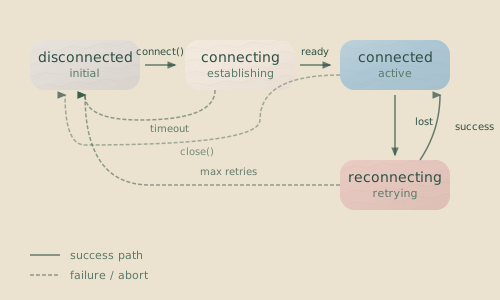
- Disconnected: No active WebSocket.
- Connecting: WebSocket is opening.
- Connected: WebSocket is open, but handshake is not yet sent.
- HandshakePending: Handshake sent, awaiting response.
- Ready: Handshake complete, ready to send commands.
Error Recovery
Production clients must handle failures gracefully. Servers restart and networks hiccup.
Automatic Reconnection
Implement exponential backoff to avoid spamming a server that is down.
class ResilientClient {
  private reconnectAttempts = 0;
  private maxReconnectAttempts = 10;
  private reconnectDelay = 1000;

  private async handleDisconnect(): Promise<void> {
    if (this.reconnectAttempts >= this.maxReconnectAttempts) {
      console.error("Max reconnection attempts reached. Giving up.");
      return;
    }

    this.reconnectAttempts++;
    // Exponential backoff
    const delay = this.reconnectDelay * Math.pow(2, this.reconnectAttempts - 1);

    console.log(
      `Reconnecting in ${delay}ms (attempt ${this.reconnectAttempts})...`,
    );
    await new Promise((resolve) => setTimeout(resolve, delay));

    try {
      await this.connect(); // Assumes connect() is defined on the class
      this.reconnectAttempts = 0; // Reset on success
    } catch (error) {
      await this.handleDisconnect(); // Retry
    }
  }
}
Syncing Missed Events
After reconnecting, you may have missed events. The handshake’s sendPreviousEvents: true flag handles this for new connections. For an existing client that dropped and reconnected, you can use a history sync command to catch up.
async syncAfterReconnect(): Promise<void> {
  // 1. Request a full event history sync
  this.sendCommand({
    id: `sync-${Date.now()}`,
    type: "history.sync",
  });

  // 2. Process batches of historical events until complete
  while (true) {
    const batch = (await this.waitForEvent("history.batch")) as HistoryBatchEvent;

    for (const event of batch.data.events) {
      // Add events to the buffer if they don't already exist
      if (!this.events.find((e) => e.id === event.id)) {
        this.events.push(event);
      }
    }
    if (!batch.data.hasMore) break;
  }

  // 3. Sort the buffer by timestamp to ensure correct order
  this.events.sort((a, b) => a.timestamp.localeCompare(b.timestamp));
}
Related Pages
- WebSocket Protocol — Complete protocol specification
- State File — State file format for offline analysis
- Event Journal — Event persistence and journaling
- Observability — Upload traces to Braintrust and Langfuse via
hankweave-trace - Debugging Guide — Using clients for debugging workflows
Next Steps
Start simple: connect in READONLY mode and log all incoming events. Once that works, add command-sending capabilities. The patterns here, derived from Hankweave’s own test suite, provide a production-proven foundation for any integration you build.